Centralize MCP access with Durin
See how Durin connects AI clients to approved tools, checks access, handles write approvals, and records decisions through a governed MCP path.
The decision in brief
Durin is a governed MCP path between AI clients and approved tool connections. People connect through their own authenticated endpoints; the workspace applies current access checks, policy, optional exact write approvals, and audit. Upstream credentials and permissions remain separate. These controls cover requests routed through Durin, while the client and model remain outside the gateway.
Why centralize MCP connections?
An employee may use one AI client for coding and another for research. Each can connect to several tools. As those connections multiply, IT needs to know who owns them, which credentials they use, which resources they expose, and where to find evidence when something goes wrong. Repeating that work in every client makes changes harder to coordinate.
Durin places a governed MCP path between clients and approved connections. Each person keeps an individual endpoint, while administrators manage connections, access policy, write review, and evidence in the workspace. This is the useful idea behind the portal or gateway pattern: a consistent operating process across tool connections. It does not require everyone to share one person’s URL.

Before: each client connects to upstream systems independently. After: clients use their own Durin endpoints and a common set of connection controls. The dashed direct path still reaches an upstream system without crossing Durin; its owner must control that route separately.
Open full-size figure: Separate connections become a shared governed route, with direct access still outside it.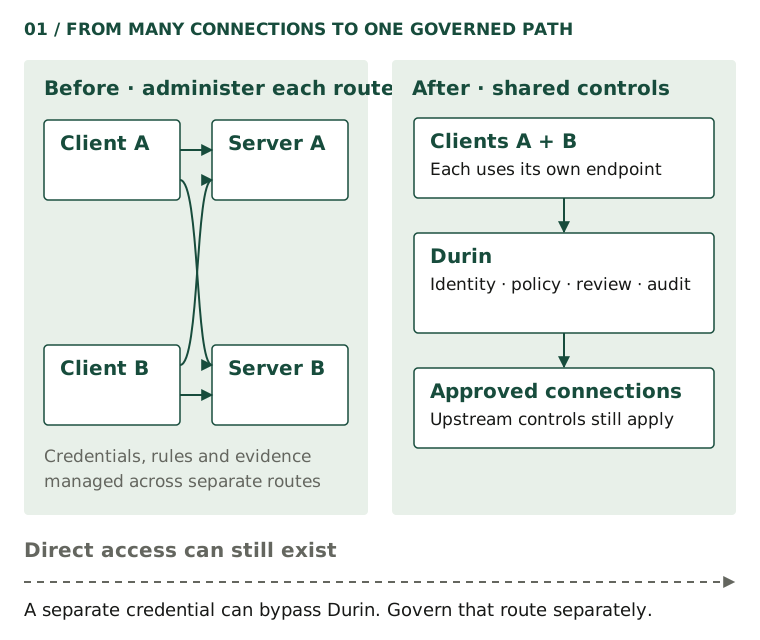
Direct MCP servers may already have effective authentication, resource controls, and audit. Centralization is useful when your team needs to administer those responsibilities consistently across several clients or systems. Start by inventorying the controls you already have, then identify the decisions that should be shared.
Keep the direct paths on that inventory. A user with a separate provider credential may still reach the same system outside Durin. Client configuration, upstream permissions, and any network controls remain part of the rollout. A successful governed call proves that route works; it does not prove that every other route has been closed.
How the architecture fits together
The AI client proposes a tool call. Durin receives the request at the personal MCP endpoint and authenticates the requester. The endpoint belongs to that account: knowing its address does not authorize another person to use it. Browser sign-in and an authenticated MCP client are separate steps.

The client and its model remain outside Durin. A personal endpoint selects an identity-bound entry point. Inside Durin, current checks and policy precede a connection. Remote MCP requests go to an upstream MCP server; native adapters call a provider API. Decision and outcome metadata form the audit trail. The synthetic sandbox stays within Durin and contacts no provider.
Open full-size figure: Personal ingress and access checks route to remote MCP or native API connections.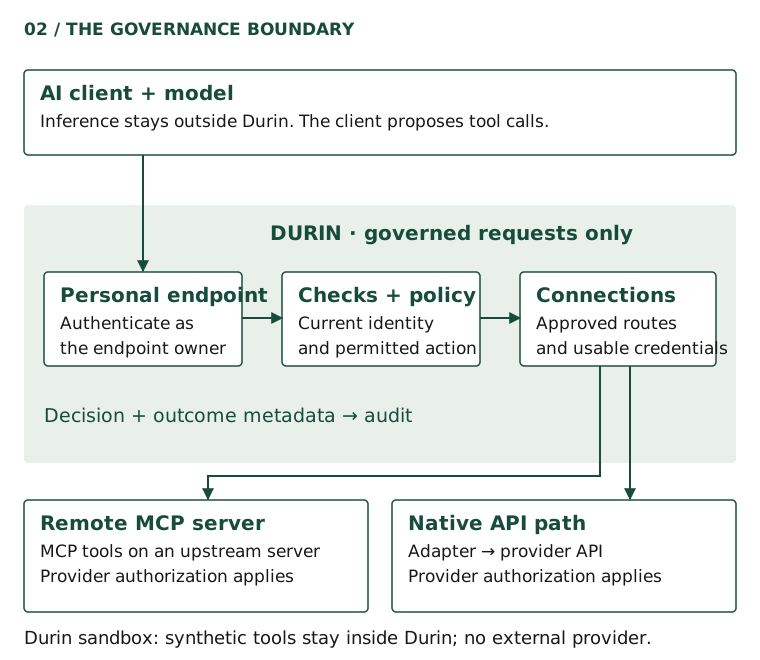
An approved connection describes the system the workspace has made available. Access still depends on the requester’s current membership and team scope, the connection’s state, the chosen credential, the reviewed tool, the resource, and inspection. Tool discovery exposes the available catalog, but seeing a tool is not a permanent grant to call it.
A remote MCP connection speaks to an upstream MCP server. A native connector implements tools against a provider API. These are different execution paths behind the same governance boundary. The built-in Durin sandbox supplies synthetic documents and tickets without reaching an external provider. Use it to learn the controls before configuring a real system.
Your model continues to run in the client’s chosen environment. Durin does not host or train it. Tool results returned to the client can reach that model provider, so apply your organization’s data-handling rules to the client too. Upstream authorization remains authoritative for what the selected provider account can access.
What happens when an agent calls a tool?
Consider a harmless read: sandbox__read_document with resource engineering/handbook. The sandbox contains a short synthetic handbook, not company documents. The client submits the tool name and arguments; Durin evaluates whether this requester can make this call now.

Authenticate and check access, then record the policy decision. Deny stops the call. Approval required pauses the action for independent review and an exact requester retry. Only a currently allowed request continues to dispatch. After an attempt, the recorded outcome is confirmed success, confirmed failure, or uncertain; uncertainty is never shown as success.
Open full-size figure: A tool call passes checks and a policy decision before dispatch and a separately recorded outcome.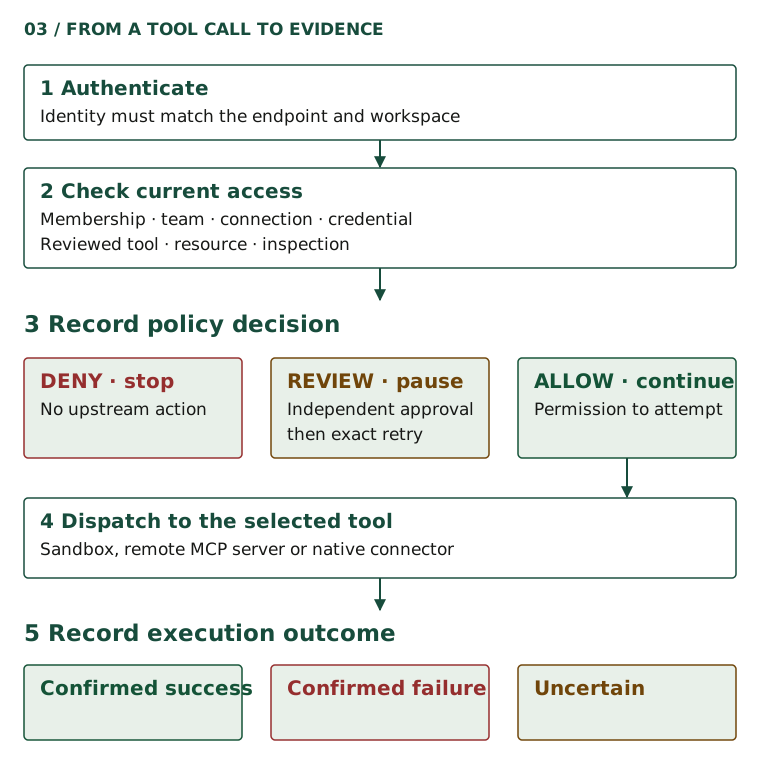
- Identify the requester. Authentication must match the personal endpoint and current workspace membership.
- Check access. The connection must be enabled and verified; team scope, personal access, credentials, reviewed tool, allowed resource, and inspection must permit the request.
- Evaluate policy. Reviewed requests are allowed by default after required checks. Administrators can choose default deny, independently require write approval, or deny writes. Team restrictions and custom policy can restrict the result further.
- Dispatch only when allowed. A denied request stops before the tool runs. An approval-required response means review and retry are needed; no action has executed.
- Inspect the outcome. The synthetic read returns handbook text on success. Decision and execution records describe what was permitted and what actually happened as separate facts.
An allow decision cannot promise that a provider will respond successfully. Authentication can expire upstream, services can fail, and a dispatched write can lose reliable confirmation. Durin distinguishes confirmed completion, confirmed failure, and uncertainty. Treat an uncertain write as something to investigate, because repeating it may create a second effect.
Connect a client to Durin
Begin in an existing Durin workspace with an administrator available to review connection requests. If you are new, complete the account and workspace steps shown during onboarding first. The exercise below uses Durin’s synthetic sandbox and needs no third-party provider account. For a demonstration before signing up, try the public request simulator linked below.
- In My workspace, open Connections and expand Connect your agents. Find Your MCP endpoint. If prompted, choose Set up your endpoint; then use Copy URL. Keep the copied address associated with your own account.
- Open Connections → Available and request Durin sandbox. An administrator opens the request in Approvals and selects Approve request. This creates the sandbox if needed. Existing access policies still apply; a disabled sandbox needs an administrator to enable it.
- Add your copied endpoint to your MCP client. The Claude Code example below comes from the same setup generator used by the website. Replace YOUR_PERSONAL_ENDPOINT_ID with the identifier in your own copied URL; the shown address is only a placeholder.
claude mcp add --transport http --scope user durin 'https://mcp.getdurin.com/mcp/u/YOUR_PERSONAL_ENDPOINT_ID'Open Claude Code and use /mcp to authenticate Durin.
Complete authentication using the account that owns the endpoint, then refresh the client’s tools. Do not paste a provider token into the endpoint URL or share someone else’s address as a team configuration. If you already have a server named durin, reconcile that existing entry before adding another. The client setup guide covers Codex, Cursor, and connection-specific URLs as well.
For a client that should see just one saved connection, open that connection and choose Set up connection URL, then Copy connection URL. Authenticate for that exact address as its owner. The full personal endpoint and a connection-specific endpoint have separate authorization audiences: a token for one is not interchangeable with the other. Resource permissions and current policy still apply to the selected connection.
Ask the client to call sandbox__read_document with resource engineering/handbook. A successful response identifies itself as a synthetic engineering handbook and states that it contains no company data. Inspect Activity for the request and its outcome; ask an administrator to inspect the organization’s audit evidence when you need the broader view.
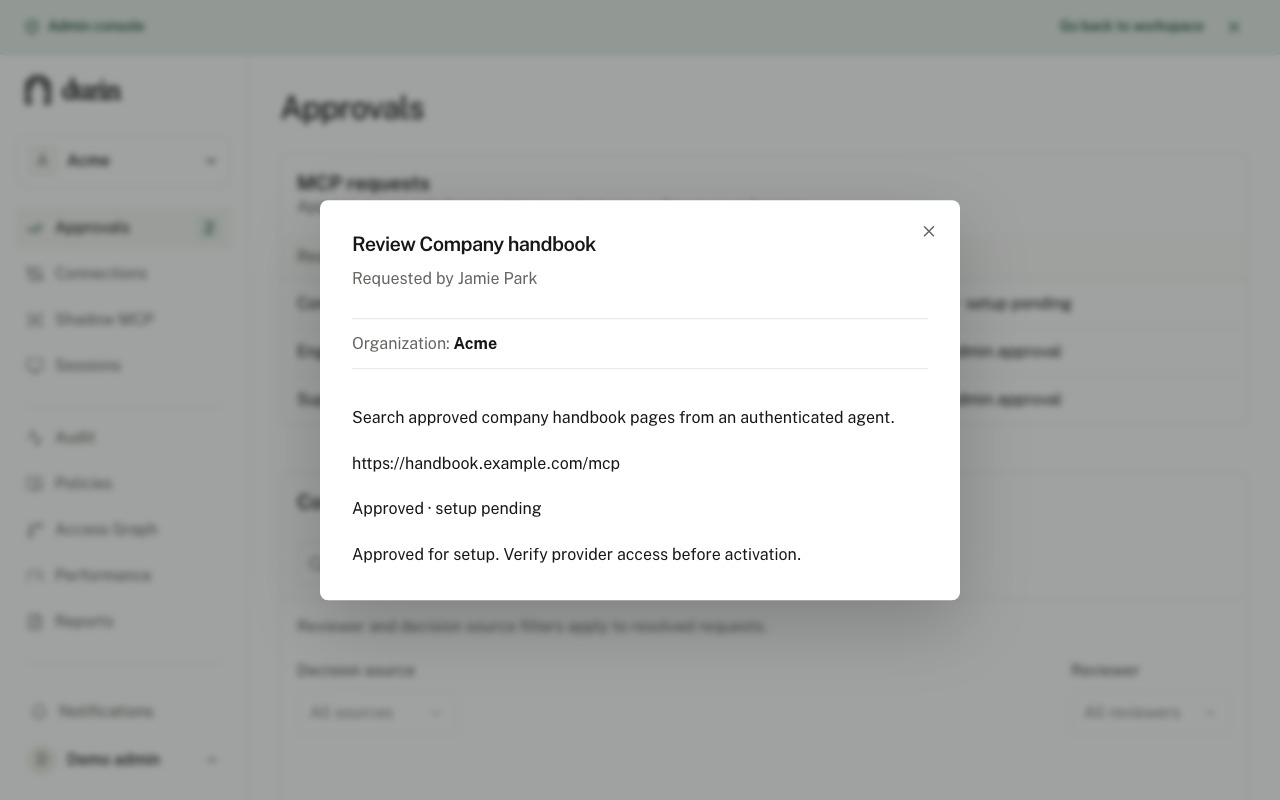
An administrator has approved this example Company handbook request for setup. The visible Approved · setup pending status and review note mean provider access still needs verification before activation. This connection request is separate from approving one exact tool action.
Open full-size figure: Durin connection review for Company handbook showing Approved · setup pending.When you move to a real provider, use its setup guide and the current connection screen. A saved draft, a listed provider, or an approved setup request is not proof of an active connection. Provider authentication, tool discovery and review, validators, readiness testing, and activation must be completed as applicable. Personal provider consent may also be required. Follow the displayed checkpoints rather than assuming the sandbox’s account-free setup applies to every integration.
Handle sensitive writes deliberately
To practice review safely, have an administrator publish Require another administrator for writes. Submit sandbox__create_ticket with resource engineering/roadmap and a short synthetic title. A different active administrator must review the action. The same person cannot both request and approve it, even if that person has administrator access.

The requester submits a write and receives a pending action. A different active administrator reviews it. An exact approval returns control to the requester, without dispatch. The requester retries the identical call with the approval reference before expiry. Durin revalidates current access and the grant before consuming it and claiming one attempt. Denied, expired or invalidated grants stop. An uncertain attempt needs investigation before another write.
Open full-size figure: A different administrator approves, the requester retries, and current checks gate one execution attempt.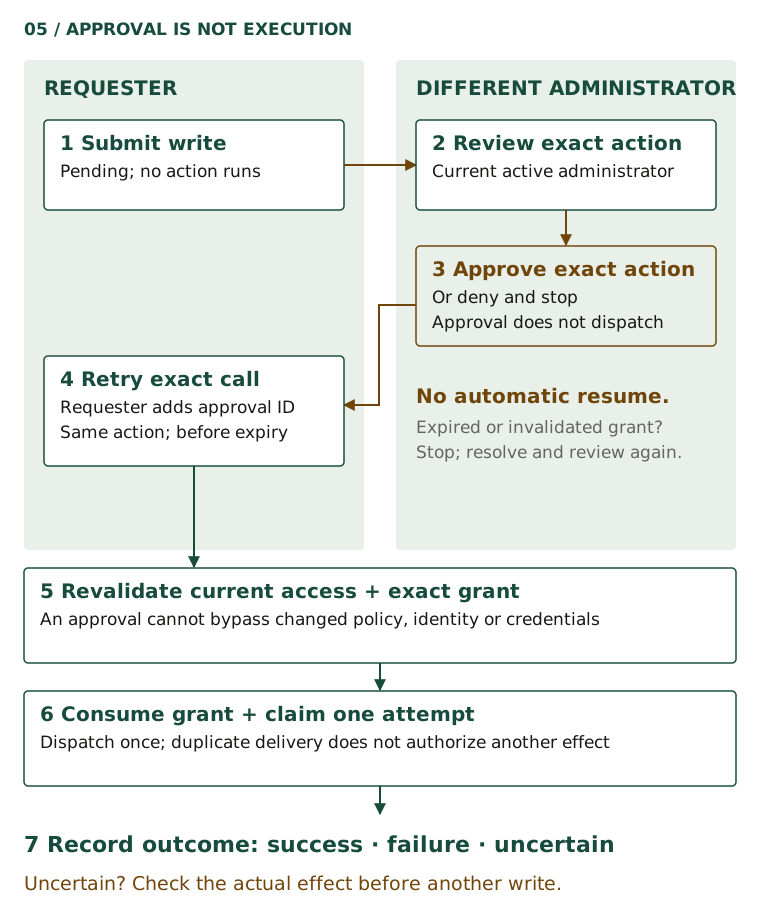
The reviewer opens the action in Approvals, checks the requester, tool, resource, argument digest, versions, and expiry, then chooses Approve exact action or Deny action. Approval binds one request to its identity, connection, credential context, tool, arguments, resource, and relevant versions. It does not grant general permission for later writes.
The retry is evaluated against current access. An expired approval, revoked membership, changed policy, altered arguments, or changed tool or credential context cannot authorize the old action. A usable grant is consumed for the execution attempt; duplicate delivery does not authorize another write. If a new review is needed, investigate the reason before creating another request.
For example, changing the synthetic ticket title after review changes the arguments. Choosing a different roadmap resource changes the target. Neither is the action the reviewer authorized. Keep the original request intact for an exact retry, or submit the changed action for its own evaluation. This gives the administrator a bounded decision instead of an open-ended permission to let the agent improvise later writes.
Finally, inspect the execution outcome. For the sandbox, a confirmed success produces a synthetic ticket. For a real provider, a lost response may leave the result uncertain. Check the provider and the recorded evidence before attempting a fresh write. Changing an idempotency key to force another attempt can duplicate an action that already happened.
Understand the boundary before rollout
When a call fails, locate the checkpoint before changing permissions. Authentication failure calls for the correct account and endpoint authorization. A policy denial calls for checking its reason, membership, team scope, tool review, and resource access. An unavailable connection may be disabled, unverified, disconnected for the user, or missing a usable credential. Those conditions are not fixed by approving the action.
An expired or invalidated approval needs a fresh review of the current request. An upstream error needs investigation of the provider and its permissions. Keep these cases separate from an uncertain dispatched write, where the action may already have taken place. Avoid treating every error as a reason to retry.
Audit evidence records decision and execution metadata. It is not a promise to archive every prompt, argument, or response. Decide what evidence operators need, review capture and retention settings, and confirm who may inspect the records. Your upstream service and model provider retain their own security and data-handling responsibilities.
- Name an owner for each connection and inventory direct access paths alongside Durin routes.
- Connect one intended member, confirm a low-risk read, and verify a denial with its recorded reason.
- Test independent review, exact retry, expiry, and revocation before expanding write access.
- Agree who investigates failed and uncertain attempts and where they will check the actual effect.
- Review current pricing and required account capabilities before planning the wider rollout.
Expand after your team can explain the route, the permission decision, and the result of an attempt. The developer guide is the next step for client integration; the governance checklist helps turn this single exercise into an operating process.