
Inside Durin: how a governed MCP request works
Follow one agent tool call through Durin, from the signed-in request and access checks to review, credential handling and the recorded outcome.
The decision in brief
Durin treats an agent’s tool call as a request to evaluate, not an instruction to follow. The gateway confirms who is calling, the organization’s runtime rechecks current access and policy, a separate broker attaches the person’s provider authorization, and each change is recorded before and after it is attempted. Rely on that path for requests routed through Durin, and keep separate controls for direct access, model providers and provider permissions.
Draw the line at the tool call
Suppose an engineer asks a coding agent to open a ticket for a failing test. Drafting the ticket is easy for the model. Creating it means calling a tool on a real system, with a real account, and leaving a change that other people will see. Durin treats that call as a request for the workspace to decide on, not an instruction to carry out.
Durin sits between agent clients and the systems a workspace has connected. The model, and the work an agent does in its own environment, such as reading local files, running tests or editing code, stay with the client. Durin does not host or train models. It governs the tool calls that reach it through a Durin endpoint, such as searching documents, reading a ticket, creating an issue or sending a message.
Each person connects through their own endpoint. A personal URL covers every connection they can use; a connection URL narrows a client to one. The URL is an address, not a password. The client signs in to Durin with OAuth for that address, then Durin derives the expected address from the verified identity and refuses a mismatch. The client never needs the provider’s token.
Behind the endpoint, a connection represents one approved system: a provider’s hosted MCP server or an MCP server your organization runs. The built-in Durin sandbox is a third kind. It answers with synthetic documents and tickets from inside Durin and never contacts an external provider. All of them sit behind the same checks.

The agent client and its model stay outside Durin and send a tool call with an OAuth token issued for that exact endpoint. The gateway verifies the token and finds the organization. A signed request, valid for 30 seconds, carries the call to the organization runtime, which rechecks current access, applies policy and review, and records intent before dispatch. The credential broker receives a signed request bound to that exact call, checks the decision again and attaches the person’s provider token. The egress service sends it to the remote MCP server over public HTTPS, without redirects or retries. Results return to the client; provider tokens do not. Direct provider access never crosses Durin.
Open full-size figure: A tool call passes the gateway, organization runtime, credential broker and egress before reaching a remote MCP server.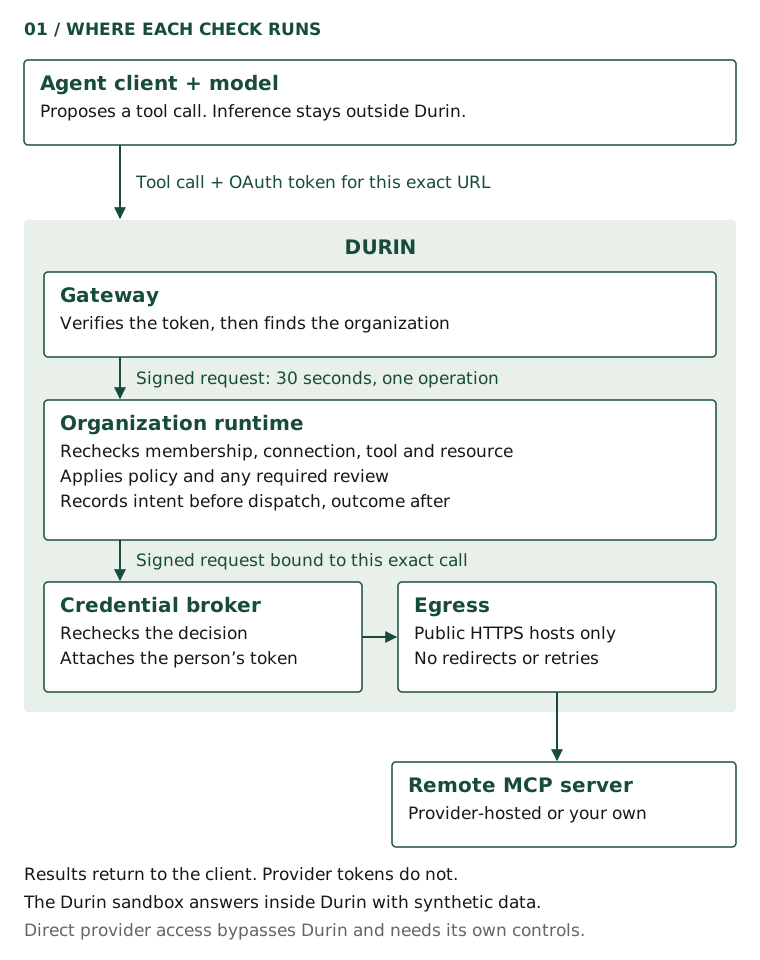
Find tools without widening access
An agent has to discover tools before it can call them. The standard tools/list request returns the provider tools a person can use, page by page. For large catalogs, Durin adds three discovery tools: durin_list_connections finds the intended connection, durin_list_tools browses permitted tool summaries with an optional text query, and durin_describe_tools returns the reviewed schemas for up to five exact names. A fourth, durin_call_tool, runs a tool by name with its arguments and an idempotency key.
Discovery is shaped by access, but it is not access. Tools that current policy would block are left out. Tools that need review, or whose result depends on the resource a call names, still appear, because the decision depends on the specific request. When something is unavailable, the response says whether sign-in, consent, review or policy is missing, without revealing the blocked tool’s definition. A connection URL limits discovery and calls to its connection, and no filter can widen that scope.
Every call is evaluated again when it arrives, because membership, policy or the connection may have changed since the list was fetched. Durin’s instructions to clients say so directly: never invent tool names, ask which connection to use when several match, and expect every call to be checked again.
One call, step by step
Here is what happens when the client calls the ticket tool. Each step runs in a service with a narrow job, and each hand-off is signed for the service that receives it.
- The gateway authenticates the caller. It verifies the OAuth access token’s signature, issuer and audience, then asks the identity provider whether the token is still active and which client it was issued to. It does this on every request, without caching. The name a client reports about itself, and any role written into the token, play no part in establishing identity.
- The gateway finds the organization from that identity, never from an organization named in a header or request body. The organization’s runtime confirms that the person is an active member and supplies their current role.
- The gateway hands the call to that runtime as a signed internal request. It names the organization, environment, person, role, client and operation, and it expires after 30 seconds. The runtime rejects a request issued for another organization, environment or operation.
- The runtime rechecks current access against its own records, not the token: membership and revocation, the connection’s state and team scope, the person’s provider authorization, the reviewed tool and the resource the call targets. The arguments must match the tool’s reviewed schema and pass inspection. Each of these checks fails closed.
- The runtime applies the workspace’s rules. By default, a request that passes these checks is allowed, including a change. Administrators can require another administrator to review changes, deny changes or deny all access. Team policies and custom rules can make a decision stricter, never looser.
- For an allowed call, the runtime records its intent and hands the call to the credential broker, which checks the decision again against current records before it contacts the provider.
- The runtime records the outcome and returns the result to the client.
Authentication and authorization stay separate throughout. A valid token establishes who is calling; it does not decide whether that person may make this call now. The runtime decides that at the moment of the call, from records it controls.
Inside the runtime, one coordinating object per organization and environment, a Cloudflare Durable Object, handles these requests one at a time. A decision, an approval, a policy change and a revocation therefore cannot interleave. If the policy changes while a call is being evaluated, the call stops with a conflict and nothing is recorded as allowed.
Run reviewed tools, not whatever a server offers today
An MCP server can change its tools at any time, including their descriptions and input schemas. When an administrator reviews a tool, Durin records a digest of its definition. The review also decides whether the tool reads or changes data, which resources it may touch and where those resources appear in its arguments. Durin does not rely on a server’s own hint that a tool is read-only, and a newly discovered tool stays inactive until it has been reviewed.
If a later discovery returns a different definition, Durin creates a new version that needs review, suspends the active one and revokes its open approvals. A person whose own discovered definition no longer matches the reviewed one is denied. A tool that has not been reviewed is denied, and its name is not offered to the client as a callable tool.
Every activated tool also needs a validator for its arguments. Durin creates one during review for straightforward schemas; a tool whose schema is too complex for that waits for a separately signed validator before it can be activated. At dispatch, the broker takes the upstream tool name and schema from the reviewed record rather than from the client’s request.
Review maps arguments to resources, too. An administrator names up to four fields in a tool’s input, and Durin joins their values into the resource that rules refer to, such as an owner and a repository. A call whose resource is not on the tool’s permitted list is denied, and a missing value does not match.
Approvals bind to one exact call
When the rules require review, the call returns approval required and nothing is sent upstream. Another active administrator, never the requester, opens the request in Approvals or, where configured, in Slack. They see the requester, connection, tool, resource, argument digest, versions and expiry, then choose Allow once, Allow always or Deny.
Approval does not run the action. The requester sends the identical call again, with the same idempotency key and the approval reference, before the approval expires 15 minutes after the original request. The runtime checks current access once more, consumes the grant, records the decision and claims a single attempt. If membership was revoked, the policy changed or the arguments differ, the old approval cannot authorize the call.
| Part of the request | Why it is bound |
|---|---|
| Requester and organization | Another person cannot use the grant. |
| Connection and credential | The grant cannot move to a different account. |
| Tool version, definition digest and mapping | A changed tool needs a new review. |
| Argument digest and resource | A different title or target is a different action. |
| Schema and policy versions | Publishing new rules invalidates open approvals. |
| Requester’s revocation epoch | Losing and regaining access does not revive an old grant. |
| One execution, before expiry | The grant is consumed by a single attempt. |
When a reviewer saves a decision
Reviewing every repeat of a routine change trains people to click approve without reading. Allow always addresses that within narrow limits. While approval memory is on, which is the default, it saves a standing grant that lasts 30 days unless the organization chooses another lifetime. A later request can then proceed without a new review if it comes from the same requester, for the same connection, tool and resource, with every bound version unchanged, and its arguments are identical or meet the organization’s match threshold, 90 percent by default.
The match is calculated from a salted, one-way sketch of the arguments, never the arguments themselves, and the same inputs always produce the same score. Anything the sketch cannot show to be similar is treated as new. Allow once never covers a later request; it is only shown to the next reviewer as precedent.
A standing grant still passes every current access check, and the broker rechecks it like any other approval. A policy change, revocation of the requester or the reviewer, turning memory off or an administrator’s revocation ends it early. Administrators can see each saved decision, and every time it was used, under Approvals → Memory.
Keep provider tokens away from the agent
For provider connections, Durin calls the provider with the requesting person’s own authorization. Each person signs in to the provider through Durin for each connection they use, so a teammate’s consent never extends anyone else’s access. The tokens are stored encrypted with AES-256-GCM. The organization, environment, connection and person are bound into each record as authenticated data, so a record cannot be opened as someone else’s. During key rotation the key ring can hold up to five keys: the newest seals new records, and every listed key can open existing ones.
Only the credential broker uses those tokens. It is a separate service that only the organization’s runtime can call, through a signed request bound to the exact body of the call and valid for 30 seconds. Before it contacts the provider, the broker reads current records again and reruns the policy decision. For a change, it also requires the recorded intent, an unchanged revocation epoch and the same credential version. It then attaches the token itself. No endpoint returns a token to the runtime, the client or the model.
Calls to provider-hosted and custom MCP servers leave through one egress service. It accepts only HTTPS requests to public hostnames, refuses redirects, limits methods and headers, and caps request and response sizes. Each call is pinned to the connection’s reviewed endpoint and makes a single tools/call, with no automatic retries.
Keeping tokens out of the model’s context does not make results harmless. Whatever an allowed tool returns can reach the client and its model provider. Durin holds each result until it has been checked against the reviewed schema and inspected, but that inspection looks for common secret formats, such as private keys and live API tokens, not every kind of sensitive data. Keep provider scopes narrow. A Durin approval never expands what the provider account itself may do.
Carry out a change at most once
Agents retry, and networks drop responses. A ticket created twice is a nuisance; a message or payment sent twice is worse. Durin is built so that one allowed request leads to at most one attempt.
- Every call carries an idempotency key chosen by the client. A replay with the same key is evaluated again first. If the arguments, tool or credential changed, it is rejected as a conflict. Otherwise it returns duplicate with the earlier status and sends nothing.
- Before the provider is contacted, the runtime writes the execution and an audit entry in a single transaction. If that write fails, the call stops. The broker refuses any change that lacks this recorded intent.
- A single dispatch claim, keyed by the execution, guards each change. A second delivery of the same request cannot claim it again.
- Durin records completed only when the broker returns a result that passes inspection. A provider error, a timeout, a missing final event or a result that fails inspection is recorded as uncertain.

An allowed change carries an idempotency key chosen by the client. The runtime first writes the execution and an audit entry in one transaction; if that write fails, nothing is sent. It then claims the dispatch once, so a second delivery cannot claim it again. The broker rereads current records and calls the provider once, without automatic retries. The recorded outcome is completed when a result returns and passes inspection, or uncertain after an error, a timeout or a failed inspection. Repeating the same key returns duplicate for an unchanged request and a conflict for a changed one; neither sends anything.
Open full-size figure: An allowed change records intent, claims one dispatch and ends as completed or uncertain.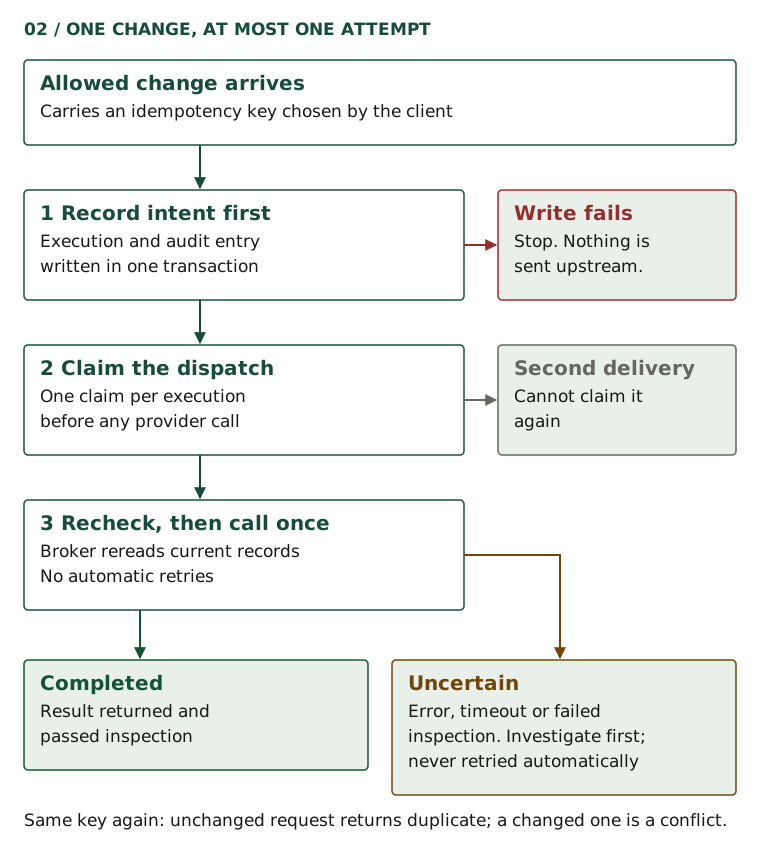
An uncertain change is never retried automatically, because it may already have happened. The client is told to inspect the record before retrying, and someone should check the provider and the audit evidence before submitting a new request. Forcing another attempt with a new idempotency key can duplicate an action that already took place. For a read, starting again with a new request is usually harmless.
What Durin records, and what stays outside
Durin records the policy decision and the execution outcome as separate entries in an append-only audit log. Database triggers reject any update or deletion, and no code path rewrites an entry. Records identify the person, client, connection, tool, resource, decision and reason, with a digest of the arguments rather than the arguments themselves. The call path does not store request or result payloads.
Durin does not see the conversation in the client. A client instrumented for it can submit the messages it actually observed through a separate capture endpoint, linked to its own executions and labeled as client-reported. Capture keeps metadata only unless an administrator turns on redacted capture. If an administrator enables an external content evaluator, it receives the arguments or results it checks; it can make a decision stricter, never looser.
Three things stay outside this path. Requests that reach a provider without passing through Durin need their own controls, such as network or identity restrictions. Your model provider receives whatever the client sends it, including tool results. And the provider’s own permissions remain authoritative: Durin can narrow what an agent does with a connection, never widen it.
To see the path for yourself, request the Durin sandbox in a workspace and make one read. Then have an administrator require review for changes, create a synthetic ticket and follow it from approval required to its recorded outcome. The evaluation kit lists the same tests for comparing any gateway.