
MCP configuration is a permission now
The Langflow vulnerabilities show why MCP connection settings need clear ownership, access checks and review, alongside controls on how agents use their tools.
The decision in brief
An MCP connection can determine both what code runs and which systems an agent can reach. Treat permission to configure a connection separately from permission to use its tools.
What the Langflow vulnerabilities exposed
Langflow’s advisory for CVE-2026-105740 describes a critical vulnerability rated 9.9. In the affected versions before 1.9.0, any signed-in user could add an MCP server using the stdio transport. Langflow passed the supplied command to bash without security validation. It ran when Langflow fetched the server list to count available tools, including when someone opened the MCP settings page. On exposed instances with the default auto-login setting enabled, documented for development only, an attacker could obtain access without an account.
MCP, the Model Context Protocol, connects AI applications to tools and data. Its stdio transport starts the server as a subprocess. That is expected behavior; the failure here was letting a regular Langflow user choose an unchecked command that ran with the Langflow process’s permissions.
The Hacker News reported Previdian’s observations of exploitation attempts against its honeypots. An update to its October 15 report put the total at 1,706 attempts from 28 IP addresses. Those figures describe attempts against decoy sensors and do not establish how many organizations were compromised.
Version 1.9.0 added command, argument and environment validation to the settings API. The follow-up advisory, CVE-2026-105697, documents paths through flows that remained vulnerable until 1.10.3. That release applied validation immediately before starting the process and removed the bash wrapper.
Teams running Langflow should upgrade to a current supported release that includes those fixes, disable auto-login, and review existing MCP server configurations. For shared installations, the advisory also recommends restricting which packages stdio servers may run.
Why connection setup needs an owner
An MCP connection can give an agent a route to repositories, support tickets, customer records or cloud accounts, within the permissions of the credentials it uses. Adding or changing that connection is an access decision. Keeping it in a local configuration file can make that decision hard for the rest of the team to see.
A connection owner should be able to explain which server is being added, who authorizes changes, and what its credentials permit. Each tool request then needs its own access checks and any review required by the team’s policies.

Decide who can add or change a server and which credentials it uses. Separately check who may call its tools and which actions need another person’s review. Record the decision and the outcome. A gateway covers requests routed through it; local process execution needs its own controls.
Open full-size figure: Connection setup and tool use have separate permission checks.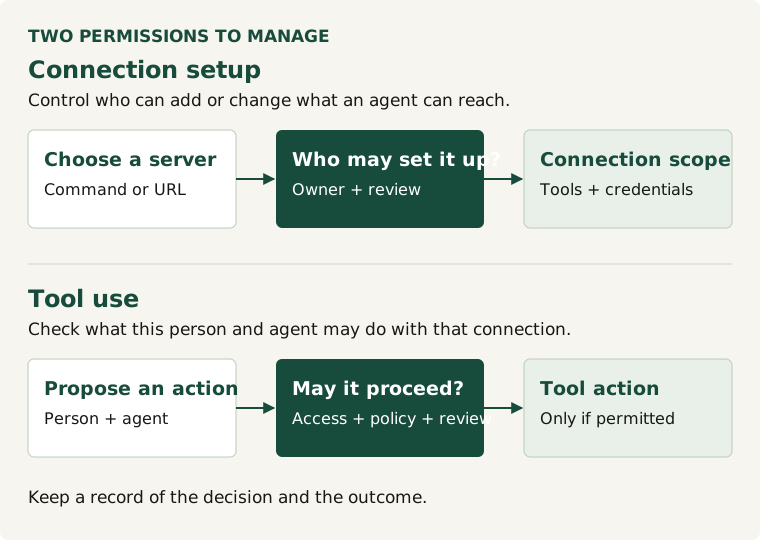
The review can use the same questions as an API review: who can call it, which systems and resources it can reach, and how changes are reviewed. Connection setup and permission to use a tool need separate checks.
For security, IT and platform teams, a useful review starts with three questions:
- Who can add or change an MCP connection?
- Which agent actions need an approver other than the person who asked?
- Which tool calls can the team inspect, and what records remain?
IT and platform teams can review these questions with security before enabling a connection, then revisit them when the server, credential scope or available tools change.
Connecting the review to ISO/IEC 42001
ISO/IEC 42001 sets requirements for an AI management system. For teams preparing for the standard, documenting MCP connections, their owners, their access and the process for reviewing changes can be a useful starting point. That record sits alongside wider work on AI risks, policies and accountability.
Durin helps teams govern MCP requests routed through its gateway. Teams can set access rules, require another person to review proposed changes, and inspect tool-call records. Controls for direct access and local process execution remain part of the wider security program.